
If you’re looking to enhance your soundbar experience with the best coaxial digital to optical audio converters, consider options like the ROOFULL Bi-Directional Digital Coaxial to Optical Converter and the PROZOR Bi-Directional Coaxial Optical Converter.
Both of these converters deliver impressive sound quality and seamless compatibility with a variety of soundbar models.
The ROOFULL Optical to Coaxial adapter simplifies connections, ensuring an easy setup for your sound system, while the PROZOR DAC effectively bridges digital audio with older devices, giving you flexibility in your audio setup.
There are many excellent choices available, so stay tuned to explore more options that will perfectly complement your soundbar and elevate your audio experience.
ROOFULL Bi-Directional Digital Coaxial to Optical Audio Converter/Adapter

If you’re looking for a reliable solution to connect your older audio devices to modern soundbars, the ROOFULL Bi-Directional Digital Coaxial to Optical Audio Converter/Adapter is an excellent choice. This adapter effortlessly converts Optical to/from digital coaxial, supporting multi-channel surround sound and high-quality audio formats like Dolby Digital and DTS. With a plug-and-play setup and a 5V1A power adapter, you can easily enhance your audio experience with your soundbar. Users appreciate its compatibility with various devices, from Blu-ray players to soundbars, and report impressive sound quality over considerable distances. Trust ROOFULL to resolve your audio compatibility issues effectively.
Best For: Users seeking an effective solution to connect older audio devices to modern soundbars while maintaining high audio quality.
Pros:
- Easy installation with plug-and-play setup and included power adapter.
- Wide compatibility with various devices, such as Blu-ray players, HDTVs, and soundbars.
- Impressive sound quality with support for multi-channel surround sound and high sampling rates.
Cons:
- Some users initially experienced issues that required a restart or customer support intervention.
- The effectiveness may depend on using the provided power supply; third-party adapters might cause problems.
- Limited output distance for digital coaxial cable (up to 10 meters) compared to optical fiber (up to 30 meters).
PROZOR Bi-directional Coaxial Optical Converter

The PROZOR Bi-directional Coaxial Optical Converter is an ideal companion for soundbar users who crave seamless audio connectivity. With its capability to convert Optical SPDIF Toslink to Coaxial and vice versa, you can enjoy LPCM2.0, DTS, Dolby AC3, and 5.1CH audio formats effortlessly. Supporting up to 192 KHz and 24-bit sampling rates, it ensures noise-free transmission across a variety of audio setups. The plug-and-play functionality simplifies installation, and it includes cables for long-distance transmission. While many users value its effectiveness, some have occasionally faced audio dropouts. Overall, it’s a dependable solution for elevating your soundbar experience.
Best For: Soundbar enthusiasts seeking a reliable way to connect multiple audio devices effortlessly.
Pros:
- Simple plug-and-play setup with provided cables for long-distance connections.
- Compatible with a wide array of audio formats and high sampling rates for enhanced audio quality.
- Sturdy alloy shell design reduces noise and improves thermal resistance.
Cons:
- Some users have reported occasional audio dropouts during operation.
- Synchronization issues may arise in certain configurations.
- Lacks a dedicated power adapter, necessitating a mobile charger or USB output for functionality.
ROOFULL Bi-Directional Optical to Coaxial Digital Audio Converter Adapter

For those looking to connect soundbars to devices with differing digital audio outputs, the ROOFULL Bi-Directional Optical to Coaxial Digital Audio Converter Adapter stands out as an ideal solution. This converter simplifies your setup with a plug-and-play design, requiring no software installation. It supports uncompressed PCM audio and compressed 5.1 formats, including Dolby Digital and DTS, all at a maximum sampling rate of 192 kHz. You can easily switch between optical and coaxial inputs. Users appreciate the sound quality and ease of installation, making it perfect for connecting older TVs to newer soundbars without hassle.
Best For: Those needing to connect soundbars to devices with different digital audio outputs, especially older TVs.
Pros:
- Supports a wide range of audio formats, including uncompressed PCM and compressed 5.1 formats like Dolby Digital and DTS.
- Plug-and-play design eliminates the need for software installation, making setup straightforward.
- Highly responsive customer service is available for support regarding defective units.
Cons:
- Some users have reported sound quality issues after extended use, necessitating power cycling.
- Limited output distance for digital coaxial connections, up to only 10 meters (32 feet).
- Cannot extract audio from HDMI or HDCP, limiting compatibility with certain devices.
Bi-Directional Coax Digital Audio Adapter

Are you looking to enhance your soundbar experience? The Bi-Directional Coax Digital Audio Adapter by Laboen is your perfect solution. This innovative adapter seamlessly converts coaxial to Toslink and vice versa, delivering high-definition audio without any interference. Its plug-and-play design means you can set it up effortlessly, without needing additional software or drivers. Compatible with a variety of devices, including soundbars, Blu-ray players, and older TVs, it’s the ideal tool for integrating your soundbar into your existing audio setup. While the adapter comes with the necessary cables, consider upgrading to higher-quality options for optimal performance. Users have praised its easy installation, significantly enhancing their soundbar audio experience. Don’t miss out on this essential accessory!
Best For: Those who want to connect their soundbars to older audio devices with minimal hassle.
Pros:
- Plug-and-play design ensures easy setup without the need for additional software or drivers.
- High-definition audio output provides clear, noise-free transmission for an elevated listening experience.
- Versatile compatibility with a range of devices, including soundbars, Blu-ray players, and gaming consoles.
Cons:
- Some included cables may not meet quality expectations, leading users to seek better alternatives.
- Initial reports of static or audio dropouts, often resolved by switching cables.
- Mixed reliability feedback, with some users experiencing functionality issues while others are completely satisfied.
PROZOR Digital to Analog Audio Converter DAC
Product not found or API error.
With its ability to convert coaxial or Toslink/SPDIF digital PCM audio signals to analog L/R RCA and 3.5mm jack audio simultaneously, the PROZOR Digital to Analog Audio Converter DAC is perfect for those who want to enhance their soundbar experience by bridging modern digital devices with older audio systems. It supports sampling rates up to 192KHz and features an aluminum alloy housing for durability. You’ll appreciate the clear audio output thanks to its advanced audio amplifier chipset, making it an excellent addition for any soundbar setup. Installation is straightforward, and it comes with a digital optical cable. Just remember, using a high-quality power source can enhance performance and minimize background noise.
Best For: Those looking to connect modern digital audio devices to older analog audio systems while enjoying high-quality sound output through their soundbars.
Pros:
- High sampling rate support up to 192KHz for clear audio quality, enhancing soundbar performance.
- Durable aluminum alloy housing provides electromagnetic shielding and heat dissipation.
- Easy installation with included digital optical cable and minimal lag in audio signal conversion.
Cons:
- Background noise may occur depending on the quality of the power supply.
- Some users may experience low volume output requiring additional amplification for optimal soundbar performance.
- Concerns about the manufacturer’s credibility and potential OEM product quality.
Monoprice Optical Toslink to Coaxial (RCA) Digital Audio Converter
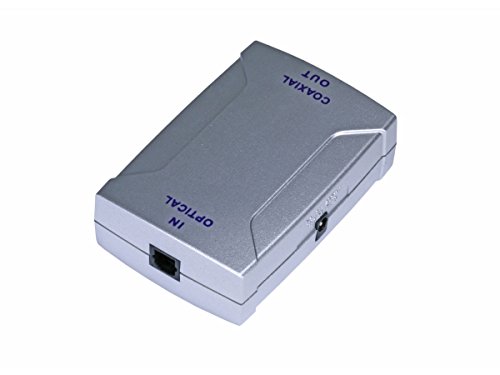
The Monoprice Optical Toslink to Coaxial (RCA) Digital Audio Converter is a great solution for soundbar enthusiasts looking to connect devices with different audio outputs. For instance, it’s perfect for linking a PS4 Pro to a soundbar that only accepts coaxial inputs. Compact and lightweight, this converter measures just 3 inches long and 2 inches wide, making it easy to integrate into your setup. It requires a 6-volt DC power supply and efficiently converts optical signals to coaxial output. While many users value its performance and straightforward installation, be mindful of potential quality control issues. For optimal use, ensure the power supply is correct and avoid disturbances that could impact the optical connection.
Best For: Soundbar users who need to connect devices with varying digital audio outputs, especially those with optical sources linking to coaxial soundbars.
Pros:
- Compact design enables easy placement behind soundbar setups.
- Effective conversion with minimal audio delay, even over long cable runs.
- Quick installation process, usually completed in under 5 minutes.
Cons:
- Some users report quality control issues, particularly with units malfunctioning due to incorrect power supply voltage.
- Sensitivity to line surges may lead to audio interruptions.
- Construction quality has been criticized for utilizing lower-grade plastic materials.
Analog to Digital Audio Converter for PS5, PS4, TV, DVD, and Soundbar
Product not found or API error.
For soundbar enthusiasts looking to enhance their audio setup, the Analog to Digital Audio Converter is an indispensable accessory. It converts analog stereo signals from RCA or 3.5mm AUX inputs to digital coaxial and Toslink optical audio, elevating your soundbar experience. With support for up to 48KHz sampling rates and compatibility with devices like PS5, PS4, TVs, and soundbars, installation is a breeze—just plug and play! The converter includes a fiber optic cable and USB charging cable, ensuring you have everything you need for superior sound quality. Enjoy crystal-clear audio with minimal effort, though it’s important to note its limitations as a one-way converter.
Best For: Soundbar users seeking to convert analog audio signals to digital for enhanced sound clarity.
Pros:
- Plug-and-Play Design: Quick installation with no driver required, making it user-friendly.
- High Compatibility: Works seamlessly with various devices including PS5, PS4, TVs, and soundbars.
- Quality Audio Performance: Supports up to 48KHz sampling rates for clear, high-quality sound.
Cons:
- One-Way Conversion: Cannot function as a digital to analog converter, limiting its versatility.
- Intermittent Audio Issues: Some users have reported occasional audio glitches or device malfunctions after prolonged use.
- Power Requirement: Requires a 5V USB power source, which may restrict placement options.
Factors to Consider When Choosing a Coaxial Digital to Optical Audio Converter
When selecting a coaxial digital to optical audio converter for your soundbar, consider several essential factors. First, check the audio format compatibility and supported sampling rates to ensure it aligns with your soundbar’s specifications. Additionally, evaluate the build quality, ease of installation, and power supply requirements to guarantee a seamless setup and optimal performance for your audio experience.
Audio Format Compatibility
How can you ensure your soundbar meets all your audio needs? Start by checking that it supports various audio formats like LPCM, DTS, and Dolby Digital (AC3). This compatibility allows you to connect a wide range of audio sources and playback devices. If you’re using your soundbar with a surround sound setup, look for multi-channel audio support to maximize your system’s capabilities. Additionally, verify that the soundbar handles both compressed and uncompressed formats, as this can significantly impact sound quality. Finally, consider models that offer input selection between optical and coaxial connections, enabling seamless switching between different audio sources without any compatibility issues. Make these considerations a priority to enhance your audio experience with your soundbar.
Supported Sampling Rates
Supported sampling rates play an essential role in selecting a soundbar, directly impacting the quality of your audio experience. High-quality soundbars typically support rates ranging from 32 kHz to 192 kHz, accommodating various audio formats, including LPCM and compressed formats like Dolby Digital. If you’re aiming for high-definition audio, look for soundbars that support 192 kHz, as they guarantee minimal loss during the conversion process. While lower rates like 44.1 kHz or 48 kHz can be sufficient for standard setups, they might not meet the clarity needed for professional audio applications. Always check that the supported sampling rates of the soundbar match those of your connected devices to avoid compatibility issues and achieve peak performance.
Build Quality and Durability
Selecting the right soundbar involves more than just checking audio specifications; build quality and durability are just as important. Opt for models with metal housing, as they offer better electromagnetic shielding and heat resistance compared to plastic casings. High-quality alloy materials can minimize interference, enhancing audio clarity and reducing background noise. Pay attention to the weight; heavier soundbars often have more robust internal components that endure wear and tear. Ensure proper cable connections and solid pin construction to prevent signal degradation and guarantee longevity. Finally, soundbars with power indicators or reliable power supplies tend to be more dependable, reducing the risk of operational failure. Choose wisely for lasting performance!
Installation and Setup Ease
When considering a soundbar with coaxial digital to optical audio conversion capabilities, what factors make installation and setup a breeze? First, look for models with a plug-and-play design. This feature allows you to set up the soundbar quickly without needing extra software or drivers. An input selection switch can simplify choosing between optical and coaxial inputs, making the process even smoother. Many soundbars include necessary cables, so you can start using them right away. Also, opt for soundbars that come with a dedicated power adapter to enhance performance. Finally, clear user manuals and responsive customer support can make a significant difference, especially if you’re new to audio equipment. These elements collectively guarantee a hassle-free installation experience.
Power Supply Requirements
Choosing the right power supply for your soundbar is crucial, as it can significantly impact audio performance. Many soundbars require an external power supply, typically a 5V1A adapter, to achieve optimal results. While some models may operate using USB power sources, the quality can vary and may affect sound clarity. Higher quality power supplies often lead to enhanced audio output, reducing noise and improving clarity. On the other hand, an inadequate power supply can cause static or audio dropouts, making it essential to use the recommended adapter. Always check the voltage requirements of your soundbar to prevent malfunctions from incorrect specifications or power surges. This attention to detail ensures you get the best sound experience from your setup.
Cable Length and Quality
While you might not think about it at first, cable length and quality play an essential role in how well your soundbar performs. Optical fiber cables can transmit signals up to 30 meters with minimal loss, while standard coaxial cables usually max out around 10 meters. To maintain signal integrity, always opt for high-quality cables; lower-quality options can lead to static or audio dropouts, especially over longer distances. For optical cables, check for any physical damage, as even small imperfections can degrade audio quality. When using coaxial connections, verify your cables meet or exceed specifications to avoid signal degradation. Remember, the right cable length and quality greatly enhance your overall soundbar experience.







