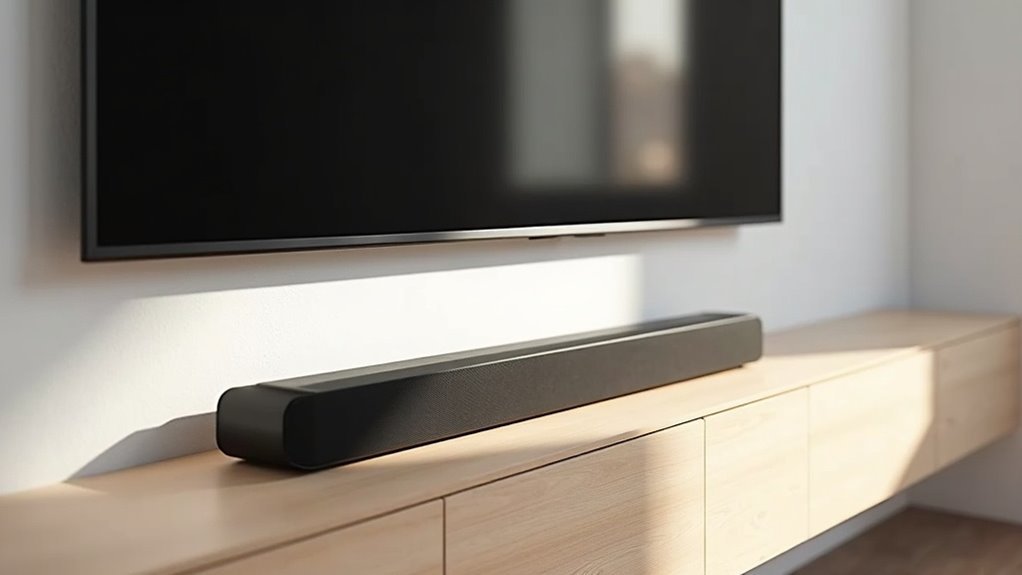
Yes, a soundbar can block your TV’s IR sensors, particularly if it is situated directly in front of thin bezels. This obstruction can cause frustrating communication issues with your remote control. To prevent this, it’s advisable to position your soundbar at ear level or consider mounting it above the TV to ensure a clear line of sight for the IR signals. Additionally, there are alternative solutions available that can effectively address these concerns.
Key Takeaways
- Soundbars positioned directly in front of TVs can obstruct IR sensors, particularly on models with thin bezels.
- Many soundbars do not come with legs, which increases the likelihood of blocking the TV’s IR sensor and interfering with remote control functionality.
- For optimal audio clarity and to maintain an unobstructed line of sight for IR signals, it’s best to place the soundbar at ear level.
- Mounting the soundbar above the TV is an effective way to prevent any obstruction of the IR sensor and can also enhance sound quality.
- To address potential remote control issues caused by blockage, consider utilizing an IR Blaster or choosing soundbars that feature CEC capabilities.
Understanding IR Sensors and Their Functionality
When setting up your soundbar for your home entertainment system, understanding how IR sensors work is essential for seamless operation.
IR sensors, typically located about 2-1/4 inches above your entertainment center, can be easily obstructed by a soundbar placed directly in front. Since many soundbars lack legs, their height often blocks the line of sight to the TV’s IR sensor, especially with thin bezels.
This obstruction can hinder remote signals, making control frustrating. To enhance performance, consider mounting your soundbar above the TV using universal brackets.
This keeps the IR sensor visible, improving functionality and ensuring that you can enjoy high-quality sound without interference from the soundbar.
The Importance of Soundbar Placement
Proper soundbar placement is crucial for enhancing your home entertainment experience.
To maximize your audio enjoyment, ensure that the soundbar is positioned at ear level and away from your TV’s IR sensor, which is typically located about 2-1/4 inches above the entertainment center.
If the soundbar is too low, it may obstruct this important sensor, disrupting the functionality of your remote control.
For improved sound quality and to avoid interference with the IR signal, consider mounting the soundbar above the TV using universal brackets.
Thoughtful soundbar placement is essential for enjoying seamless operation and superior audio performance in your home.
Common Issues With Soundbar and TV Interference
When setting up your soundbar, you might encounter issues with the IR signal being blocked by the TV remote.
If the design of your soundbar obstructs the TV’s IR sensor, it can be frustrating to manage your viewing experience.
Let’s explore some effective placement solutions to improve compatibility and usability, ensuring you enjoy optimal sound without interference.
IR Signal Blockage
IR signal blockage is a common issue that many users encounter with soundbars. When soundbars are placed directly in front of your TV, they can obstruct the IR sensor, making your TV remote less effective.
This design flaw often leads to frustrating usability problems. If your soundbar lacks legs, it may sit too low, further complicating the situation.
To avoid this, consider mounting your soundbar above the TV using a universal bracket. This not only enhances sound quality but also helps maintain the IR signal’s path, ensuring your remote works seamlessly without additional gadgets like IR repeaters.
Soundbar Placement Solutions
Finding the ideal placement for your soundbar can significantly enhance your audio experience while ensuring the TV’s IR sensor remains unobstructed.
Since most soundbars don’t come with legs, positioning them too low can block the IR sensor. For optimal results, consider mounting your soundbar above the TV using universal brackets. This not only elevates the sound quality but also prevents any interference with the IR signal.
If your soundbar features feet, be mindful of its height to ensure proper placement. Additionally, exploring soundbar mounting solutions or risers can help elevate both your TV and soundbar, reducing clutter and ensuring a clear path for IR signal transmission.
TV Remote Compatibility Issues
While enjoying your favorite shows, you might encounter frustrating compatibility issues between your soundbar and TV remote.
These problems often arise due to the placement of your soundbar, which can obstruct the TV’s IR sensor. Here are three common issues:
- Blockage: Soundbars positioned too low can block the IR sensor, disrupting communication with your remote.
- Interference: Some soundbars can affect the IR signal, making it difficult to control your TV’s functions.
- Design Flaws: Certain brands may have low-placed IR sensors that complicate remote usage with soundbars.
To enhance your soundbar’s functionality and optimize your viewing experience, consider mounting it above the TV.
Ideal Mounting Options for Soundbars
To achieve the best audio experience from your soundbar, it’s essential to consider its mounting position in relation to your TV.
Mounting the soundbar above the TV is often the ideal choice, as it enhances sound quality and prevents blocking the IR sensor. If your soundbar lacks legs, consider specific mounts like the Yamaha YTST500, which are designed to securely fit VESA-compliant TVs.
Additionally, elevating the soundbar to ear level using TV risers or soundbar-friendly shelves can improve audio quality while minimizing any interference with remote control functionality.
Proper mounting options significantly enhance your overall viewing and listening experience with soundbars.
Choosing Low-Profile Soundbars
Choosing the right low-profile soundbar can significantly enhance your home theater experience while ensuring that your TV’s IR sensor remains unobstructed.
Here are key factors to consider when selecting a soundbar:
- Height Specifications: Ensure the soundbar’s height won’t block the IR sensor, typically located about 2-1/4 inches above the surface.
- Adjustable Features: Opt for soundbars that come with adjustable mounting options or built-in feet for optimal positioning.
- TV Compatibility: Check the compatibility with your TV model, as some designs can inadvertently interfere with remote control signals.
Benefits of Mounting Soundbars Above the TV
Mounting your soundbar above the TV can dramatically enhance your viewing experience.
By positioning it at ear level, you’ll enjoy clearer dialogue and richer sound quality while also avoiding any IR signal blockage for seamless remote use.
Plus, this setup keeps your space looking neat and organized, eliminating clutter from your entertainment center.
A well-placed soundbar not only complements your TV but also elevates your overall audio experience, making your home entertainment setup truly immersive.
Improved Sound Quality
When you mount your soundbar above the TV, you’re likely to experience a significant enhancement in sound quality. This configuration elevates your viewing experience by providing:
- Enhanced audio clarity: Positioning the speakers closer to ear level minimizes sound distortion, leading to clearer dialogue and music.
- Reduced reflections: Correct placement helps eliminate unwanted echoes, resulting in a fuller and more immersive sound.
- Optimized sound projection: Utilizing universal brackets ensures stability and precise alignment, boosting the overall acoustic performance.
By installing soundbars above the TV, you not only enjoy superior audio quality but also maintain unobstructed IR signal access for seamless remote control functionality.
Additionally, this setup contributes to a tidier appearance in your living space, enhancing its aesthetic appeal.
Enhanced IR Signal Accessibility
By positioning your soundbar above the TV, you can significantly improve the accessibility of the IR signal from your remote control. This arrangement prevents the soundbar from blocking the TV’s IR sensor, ensuring a clear line of sight.
As a result, you’ll experience fewer attempts to adjust the volume or change channels, making your home entertainment experience smoother. With universal brackets for optimal alignment, your soundbar not only enhances audio quality but also integrates seamlessly with HDMI ARC.
Elevating the soundbar creates a more immersive listening experience while reducing frustration with remote control usage. Enjoy a streamlined and user-friendly home entertainment setup with your soundbar!
Optimal Viewing Height
Positioning your soundbar above the TV not only enhances the accessibility of the IR signal but also provides significant benefits for your overall soundbar experience.
Here are three key advantages:
- Improved Sound Quality: Aligning the soundbar closer to ear level optimizes acoustic performance, delivering clearer and richer audio.
- Unobstructed IR Sensors: Elevating the soundbar prevents it from blocking the TV’s IR sensors, ensuring seamless remote control operation for your soundbar.
- Cleaner Aesthetic: Mounting your soundbar reduces clutter on your entertainment center, enhancing the visual appeal of your soundbar setup.
Alternative Solutions for IR Signal Issues
If you’ve noticed your remote control struggling to communicate with your TV due to the placement of your soundbar, you’re not alone. A soundbar positioned too low can obstruct the TV’s IR sensor.
One effective solution is to mount the soundbar above the TV, ensuring a clear line-of-sight for the IR sensor. If that’s not feasible, consider incorporating an IR Blaster to retransmit signals from your remote control.
Additionally, opting for soundbars that feature built-in CEC capabilities can simplify your setup and enhance convenience.
Finally, using a power strip with a macro remote can help manage multiple devices without the need to aim directly at the TV’s IR sensor.
Tips for Optimizing Your Home Theater Setup
To create an immersive soundbar experience in your home theater, you’ll want to pay close attention to the placement of your soundbar and TV.
Follow these tips to optimize your setup:
- Position the soundbar wisely: Ensure that the soundbar doesn’t obstruct the TV’s IR sensor, which is typically located about 2-1/4 inches above the surface.
- Consider mounting options: If feasible, mount the soundbar above the TV to enhance audio quality and avoid interference with the TV’s functionality.
- Elevate your setup: Utilize risers or cabinets for both the TV and soundbar to improve both viewing angles and audio performance.
These steps will help you achieve a seamless soundbar experience in your home theater.







